|
|
- As complicated it may seem to users who don't have experience with wiki interfaces, after going through this module, navigating through this site will turn out quite easy for everyone.
- A thumb rule is any text that is blue is link on the wiki, and can be opened just by clicking it (Example: Main Page). If it is red (Example), then the page is linked, but there is no content actually present. As you hover onto these links, an underline is previewed onto the text - so you know that is link to another page.
- Users can navigate through various components on the interface; User options, Search bar, Sidebar (main + tools), Categories
- Apart from the above-mentioned, the module will also include about navigating training pages for cohorts from 2020.
Primary navigation
User options
- Users options bar contains links specific to the user account which is logged in. If not logged in, it shows options to log in or request an account.
- User name/page: You can access your user page through this link. You will learn more about this on user account maintenance module.
- Alerts: The bell and message box icons show your notifications that require your attention. If they say 1, 2, 3 ... that indicates the number of notifications you have, yet to read.
- Talk: Every user has a talk page. Any user (unless blocked) can post a message to another user's talk page, for communication.
- Preferences: further explained under user account maintenance module
- Watchlist: Page you have created, such as your fellow page, school page, and any other resources, will be added to your watchlist. You will be notified when someone edits or performs any other action on those pages. You can edit the list of through this link.
- Contributions: You can check all the edits made by you on this wiki.
- Log out: To log out of your user account.
Top tabs
- Top tabs contains links specific page you are currently on. This may be hidden on some page, for better user experience.
- First tab: The left most tab contains main content of the page, is generally what users go to.
- Discussion: If you want to start/participate in a discussion regarding the content.
- Edit: When you click this button, you change from viewing an article or discussion about an article, to being able to edit the article, or add comments to the discussion that is going on.
- View history: All editable pages have an associated page history, which consists of the old versions of the wikitext, as well as a record of the date and time (in UTC) of every edit, and the username or IP address of the user who wrote it.
- Watch/unwatch: By clicking the small star button next View history, you can add a page to your watchlist. You can unwatch by clicking the same button.
Search bar/box
Side bar
- Side bar is consolidate of helpful links that you can directly access. These pages are generally what fellows access the most. These may be different from what are shown in the screenshot above, as they are subject change, as per the community's needs.
- Toolbox
- What links here: Useful for tracing where this article is referenced from
- Related changes: List of changes made recently to pages linked from the specified page
- Upload file: Help with properly uploading images and other files to Wikipedia
- Special pages: All the special functions and administration options can be found here
- Permanent link: Used to link to a specific version of a page.
- Page information: Contains meta-data about the page, mostly useful for administrative purposes.
- Generate QR code: To generate a quick response (QR) code for accessing the page.
Categories
- Categories are explained in the "Structure" module, later in this tutorial.
Training (from cohorts from 2020)
- Training page can be accessed from the side bar. After clicking on it, you will land on the training overview page, where you will have links to all the sessions, discussions, and additional resources.
- Please note that once you are in the training space, which has the prefix year to all the pages, the sidebar changes accordingly.
Session pages
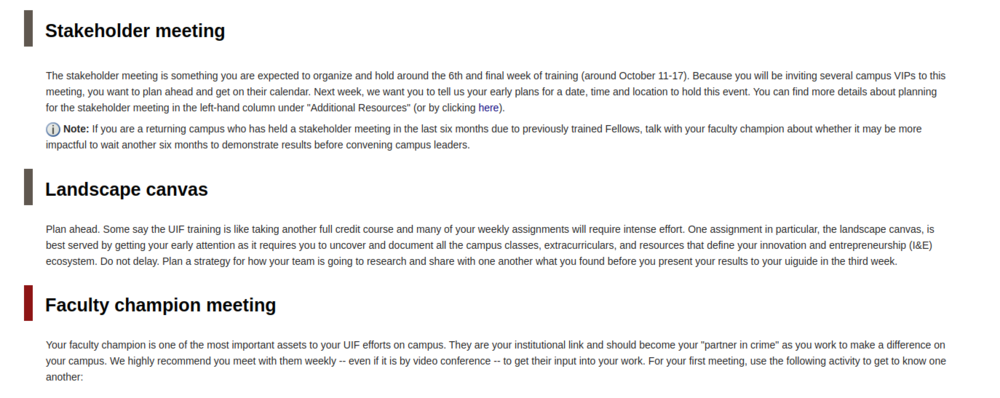 On session pages, you will find a color strip preceding the section headings. Each of these have a specific purpose; Grey: You just to have to read; no specific action to be taken. Dark red: You have to read, and take an action i.e. it may contain an assignment, details of submission, or task you need to do as part of your training. So watch out! 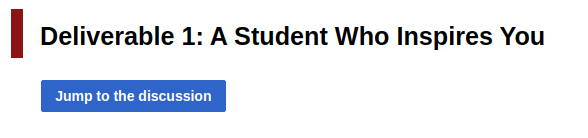 1) The blue buttons which say "Jump to the discussion" take you the discussion pages, where you are required to post according to your assignment. 2) Please note that these are also mandatory components of your training, apart from your assignments, and are always marked in red.  1) The session bar helps you navigate between different sessions. You may also navigate using the sidebar. 2) Click on "Mark as read" button after you completed reading a certain session page. You can do this after reading, but not necessarily wait until you complete related assignments. This will help the UIF staff and your mentors to track the training progress. Additional resources
- Additional resources are not part of the main training, but will help you in efficiently completing your training related tasks and assignments.
 The additional resources bar helps you navigate between different sessions. You may also navigate using the sidebar. |


